All help pages
Teach Freehold from your own work
Teach Freehold to write in your house style, or to predict yes-or-no answers, such as which invoices will be paid late, from your own past cases. It learns on your Mac, shows you how good it is, and can always be undone.
Freehold can learn in two ways. Both happen on your Mac, only when you start them, and both can be undone.
| What it learns | What you need | |
|---|---|---|
| House style | To write more like the answers you liked | 20 answers you gave a thumbs up 👍 |
| Predict from a table | To answer yes or no for new cases, such as "will this invoice be paid late?" | A table of at least 100 past cases with the answer filled in |
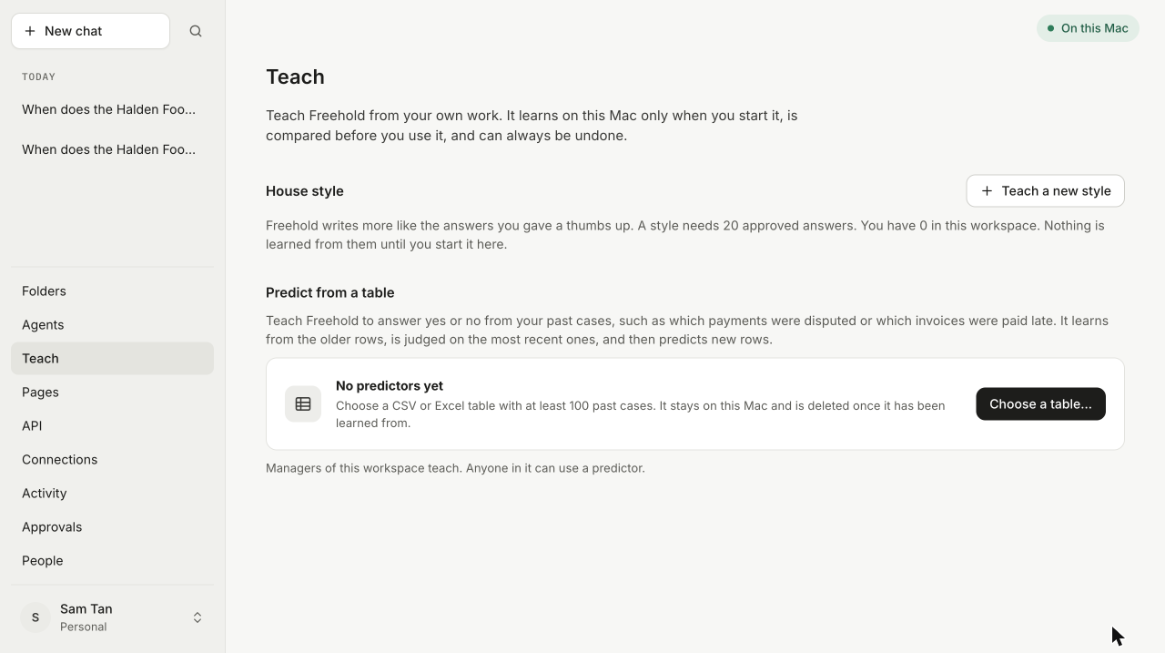
Predict from a table
What you need
A CSV or Excel table where each row is one past case, and one column holds the answer, with exactly two values, such as Yes and No. For example, a list of past invoices with a column Paid late.
Teach it
- Click Teach on the left.
- Under Predict from a table, click Choose a table… and pick your file.
- Under Which column holds the answer?, choose the column with the yes-or-no answer.
- If you already decide this some other way today (for example, a rule your team follows) and it's a column in the table, choose it under Is there a column that shows how this is decided today? Freehold then compares itself with it.
- Read which columns it will learn from, and which it leaves out and why.
- Click Teach it. It usually takes seconds.
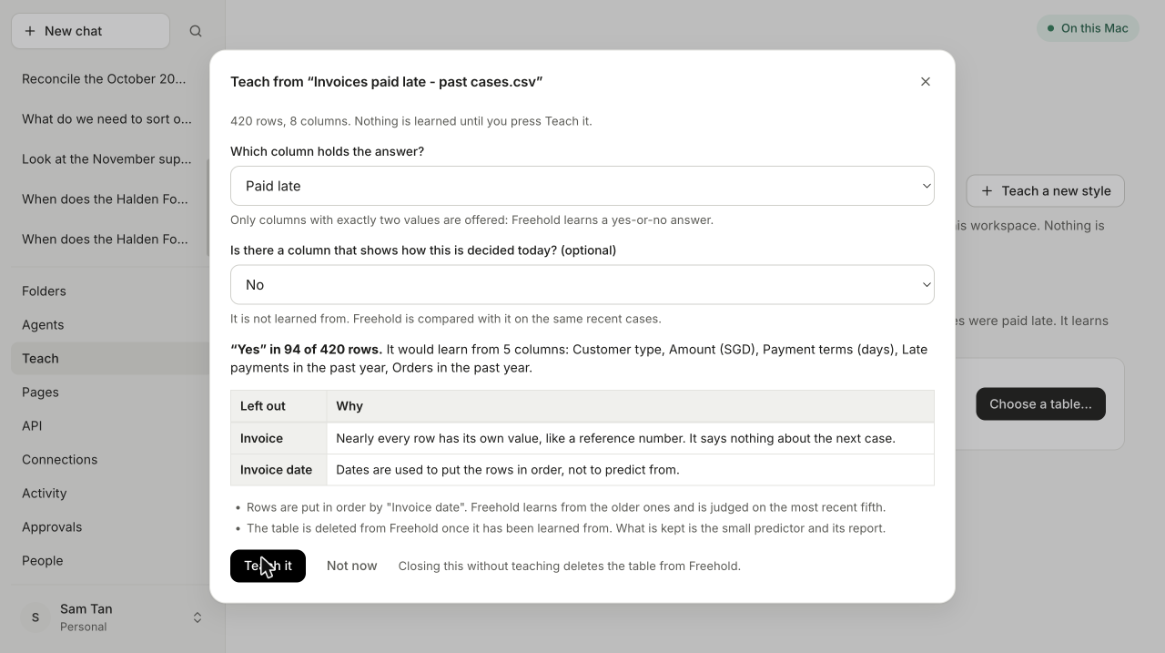
Freehold learns from the older rows and is then tested on the most recent fifth, which it never saw while learning. Your table is deleted from Freehold once it has learned from it: only the small predictor and its report are kept.
Read its report card
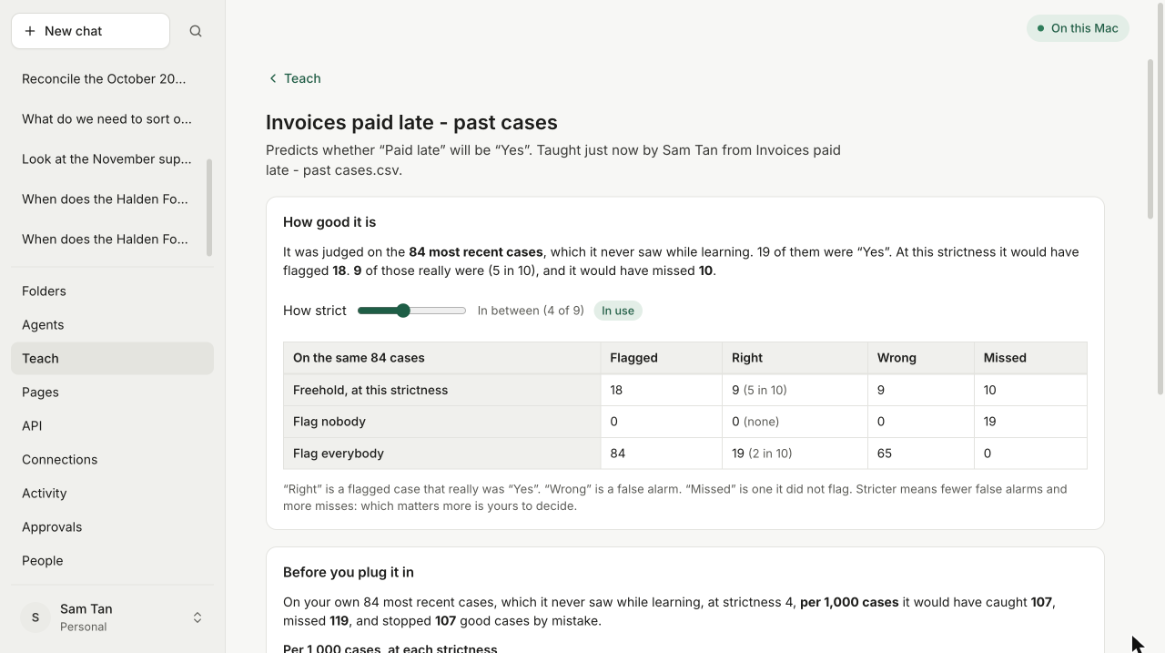
The table compares Freehold with two simple choices: flagging nobody, and flagging everybody. Read it like this:
- Right: it flagged a case, and the case really was "Yes".
- Wrong: a false alarm.
- Missed: a "Yes" it didn't flag.
How strict changes the balance. Stricter means fewer false alarms but more misses. Which matters more is your decision.
Before you plug it in
Before you use a predictor for real, this part shows what it would have done per 1,000 cases, at each strictness, on your own recent cases. Type what a missed case costs you and what a mistaken stop costs you, and Freehold shows which strictness costs least.
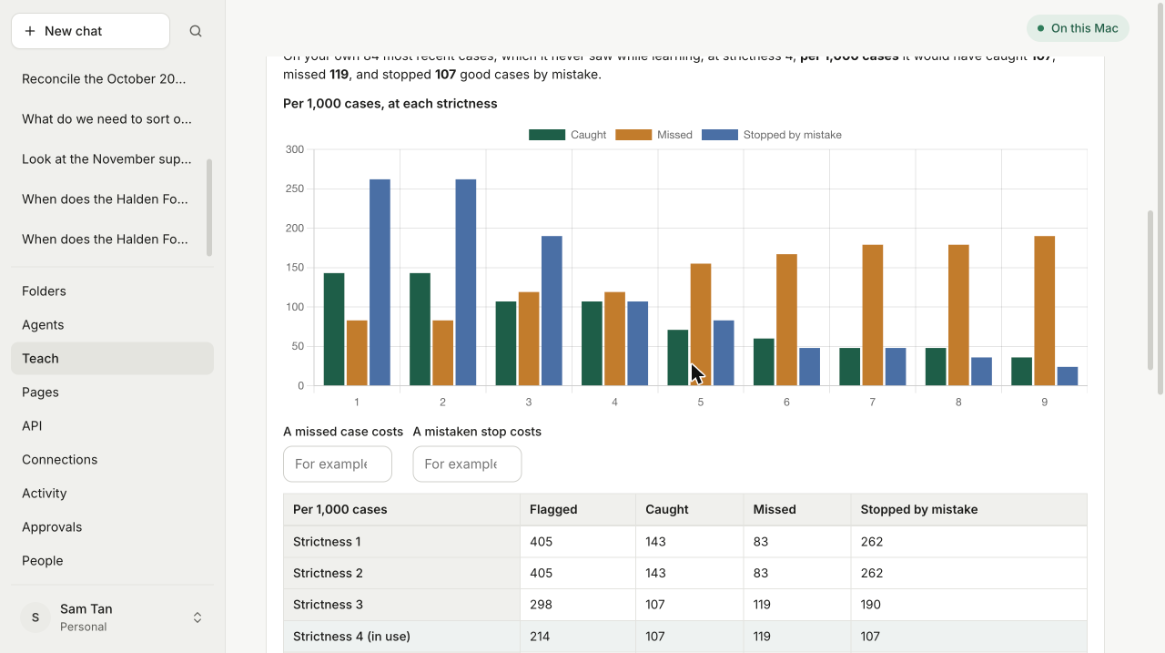
Click Make a report for whoever has to agree for a report you can show your manager or your auditor. It includes What it goes by: the columns it leans on most.
Use it
- Predict for new rows…: give it a table of new cases with the same columns. You get it back with two columns added: the prediction, and how likely it thinks "Yes" is. Nothing about those rows is kept.
- Other systems can use it through the API.
Keep it honest
When you know the answers for newer cases, click Check against newer cases…. Freehold says whether it is still finding as many, and being right as often, as when it was tested. To stop using it, click Remove this predictor.
A predictor finds patterns in your past cases. It can be wrong, and it can repeat unfairness that was in the past data. Never use it alone to decide something important about a person. Have someone review the cases it flags.
House style
Each time you like an answer, click 👍 under it. When a workspace has 20 approved answers, you can teach a style:
- Click Teach on the left.
- Under House style, click Teach a new style.
- Choose how:
- Show it examples: Freehold shows the model your approved answers as examples of the style. Quick, and nothing new is made.
- Teach the model itself: the model learns from your answers on your Mac, and you get a model of your own. Only on a Mac with Apple silicon, and it takes longer.
- Read the plan, then start it.
Freehold compares the new style with the old one before you use it, and you can always switch back.
Teaching the model itself
The first time, this needs a kit fetched once for your Mac: Apple's training tools, and the original files of the model from its makers on Hugging Face. Only the owner can fetch it. Click Check what it would fetch first: Freehold asks Hugging Face for the list of files and shows the size, before anything is downloaded.
The result appears in the model menu as Your own model. You can switch back at any time, and you can take it away as a folder that works with Ollama and Apple's MLX tools.
Does something here not match what you see? Tell us, and say which page.