All help pages
When something isn't working
What to do when Freehold won't open, the model won't download, an answer is wrong or slow, or a colleague can't reach it.
Start here: Health
Most problems show up in Settings, Health. Click your name in the bottom-left corner, then Settings, then Health. It checks each part of Freehold and says, in plain words, what to do about anything that isn't right.
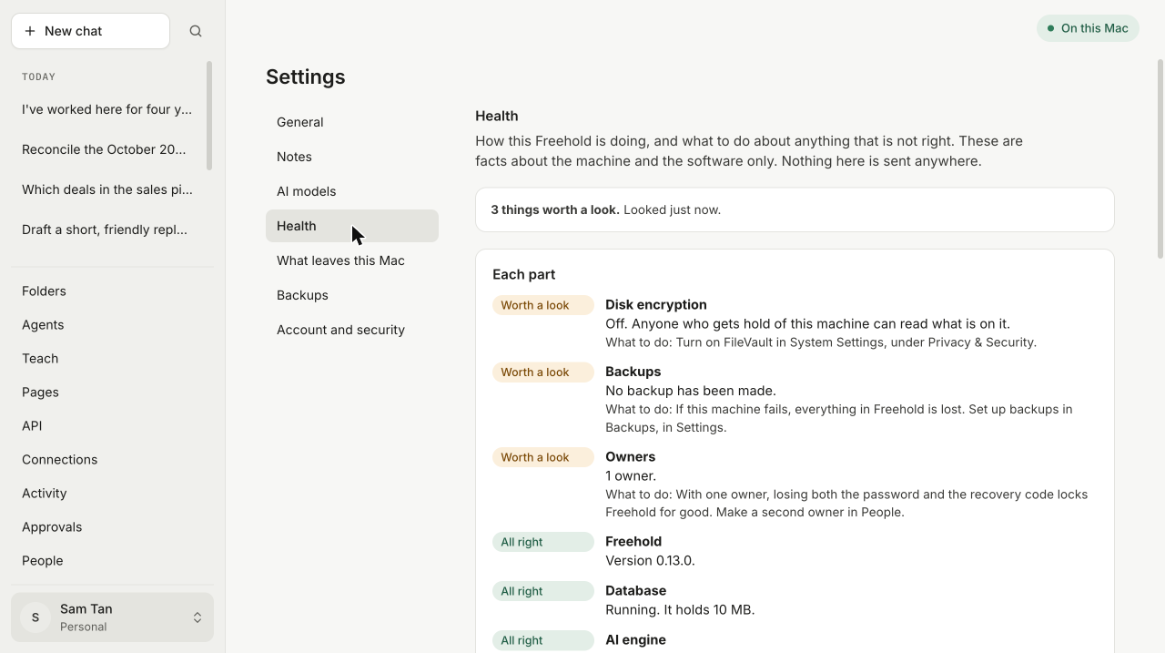
If you ask someone for help, click Copy at the bottom of Health. It copies these facts as text, without file names, chats or email addresses, so you can paste them into an email.
Common problems
| What you see | What to do |
|---|---|
| macOS says it can't open Freehold, or that it can't check it | Follow step 3 of Download and open Freehold: System Settings, Privacy & Security, Open Anyway |
| "Freehold needs a Mac with Apple silicon" or "at least 8 GB of memory" | This Mac can't run Freehold. Nothing was installed or changed. Move Freehold to the Trash |
| "Almost ready. The AI model has not been downloaded yet" | Choose and download a model. See Choose your AI model |
| The model download stopped | Check your internet connection, then click Download again. It carries on from where it stopped |
| "Waiting its turn" | Freehold writes one answer at a time. Your question starts when the ones ahead of it finish |
| An answer takes a long time, with "Thinking…" | The model is working it out first. Wait, or switch on Quick for simpler questions |
| "This did not finish" with a message about the AI engine | Click Try again. Freehold restarts its engine by itself. If it keeps happening, quit Freehold and open it again |
| The answer is wrong | Click the source numbers and read the passages. Ask again more precisely, turn Quick off so it thinks first, or try a bigger model |
| "The answer does not point to any of the passages it was given" | Freehold couldn't link the answer to your files. Treat it as unchecked and verify it yourself |
| It says nothing in your folders answers the question | Check that the right folder is added and shows Ready, and that the file is a type Freehold reads. A scanned PDF has no text to read |
| A folder shows files "held back" | Freehold found a file that looked unsafe or broke its reader, and didn't use it. Open the folder's … menu, Show files to see which |
| A colleague can't open Freehold | Your Mac must be on and awake, with Freehold open. On the office network, check the switch in People and that you restarted Freehold. From outside, see Tailscale |
| You forgot your password | Use your recovery code. See Password and recovery code |
Still stuck?
Email hello@getfreehold.ai with what you were doing, what you expected, what happened, and the text you copied from Health. Please don't send your files or chats: we don't need them.
Does something here not match what you see? Tell us, and say which page.